Add targeting sources so Oxelio knows which Instagram accounts or hashtags to draw followers from.
Sources
Overview
Sources are the foundation of Oxelio's targeting. A source can be an Instagram account or a hashtag whose followers Oxelio will follow on behalf of your client. When you add a source, Oxelio collects the followers of that account or hashtag and uses them as a pool of people to target — because they already follow a similar account, they're far more likely to follow your client back.
How it Works
Oxelio works through the followers of your sources, following them one by one throughout the day according to the daily targets set in Dynamics. When a followed user follows back, that's a real, organic follower gained.
Multiple sources can be active at the same time. Oxelio rotates through them so no single source is exhausted too quickly. Once all the followers of a source have been processed, the source is marked as depleted — you'll need to add new sources to continue growth.
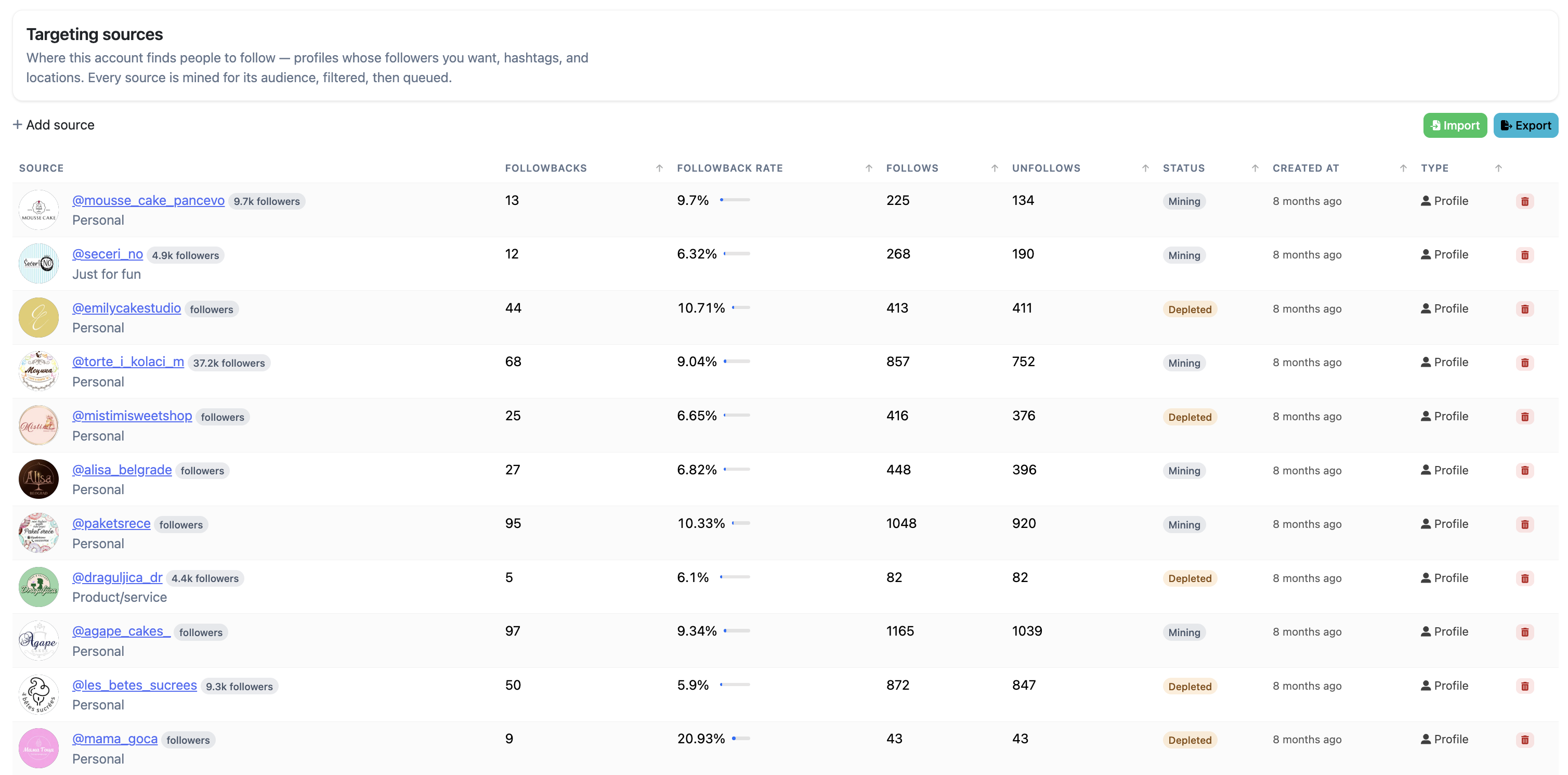
Source Status
Each source has a status:
- Mining — Oxelio is currently drawing followers from this source.
- Awaiting Mining — Oxelio has queued the source and is preparing to collect its followers.
- Depleted — all followers have been processed. Add a new source to maintain growth.
- Blocked — the source cannot be used.
What to Expect
After adding a source, Oxelio begins collecting its followers. Depending on the follower count or usage, this can take a while. Once collected, the followers appear in the Action Queue and Oxelio begins following them during its next action window.
The quality of your sources directly affects the quality of growth. A well-chosen source — one with an engaged, niche-relevant following — will produce better followback rates than a large generic account.
How to Configure
- Open the account from the dashboard.
- Go to the Targeting Sources page.
- Click + Add source.
- Enter the Instagram username of the account whose followers you want to target, or a hashtag you'd like to use.
- Click Save — Oxelio will begin collecting that account's followers.
- Repeat to add multiple sources. Having 5–10 active sources is a good starting point.
To remove a source, click the remove icon next to it. Removed sources and their history are stored in Removed Sources. You can also export your current source list using the Export button.
Bulk Import
If you have a list of sources ready, you can add them all at once:
- Go to the Sources page.
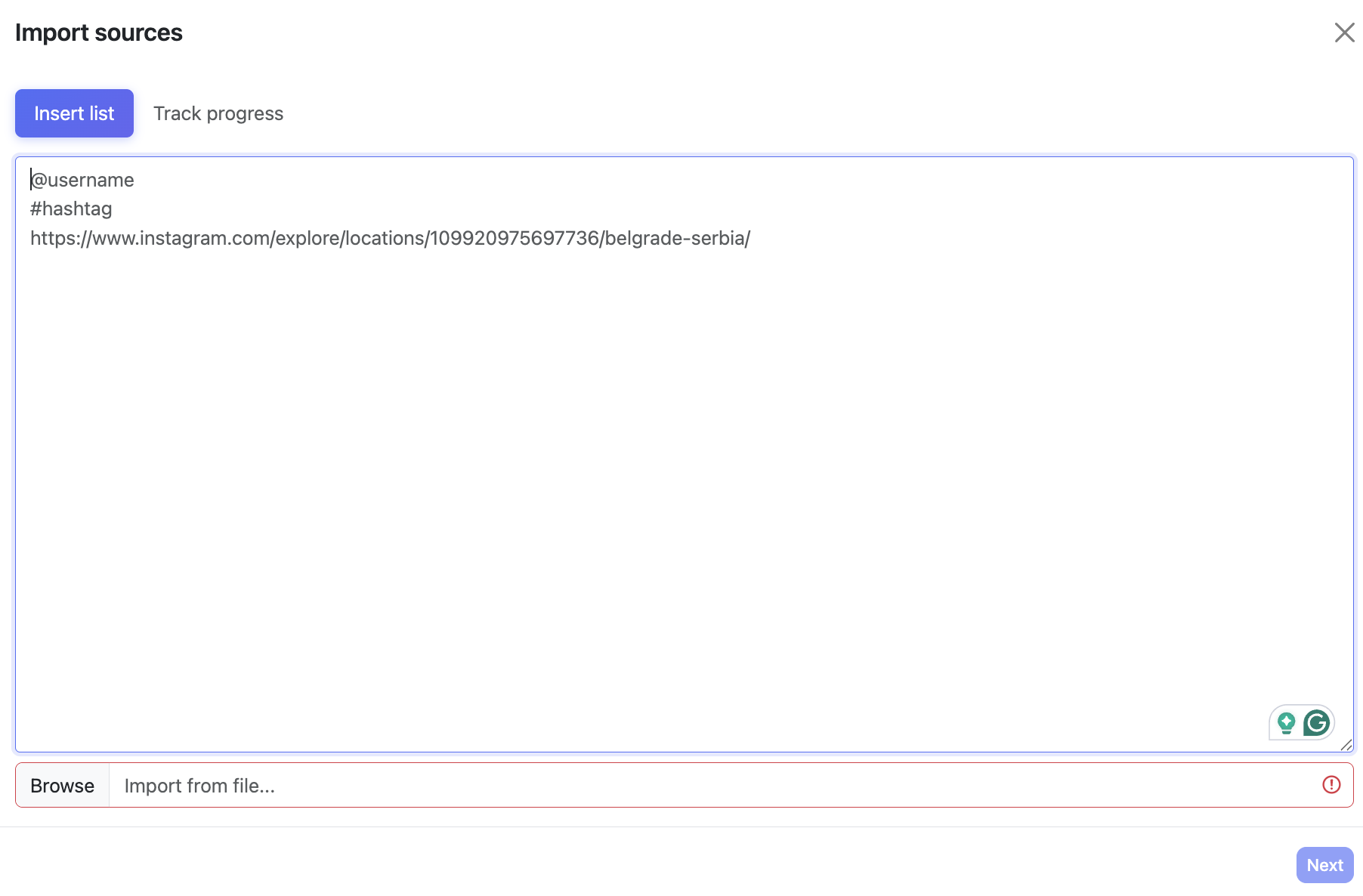
- Click Import in the top right (next to Export).
- Paste your targets — one per line. You can use usernames, hashtags, or Instagram explore URLs.
- Optionally click Browse to import from a file.
- Click Next to confirm.
Dashboard Settings
| Column | Description |
|---|---|
| Source | The Instagram account or hashtag being used as a targeting source. |
| Followbacks | Total number of people from this source who followed back after being targeted. |
| Followback Rate | Percentage of targeted users who followed back. A higher rate means the source audience is a strong match. |
| Follows | Total number of follow actions Oxelio has performed from this source. |
| Unfollows | Total number of unfollow actions performed on users originally targeted from this source. |
| Status | Current state: Awaiting Mining (queued, preparing to collect), Mining (actively collecting), Depleted (all processed), or Blocked. |
| Created At | When the source was added to this account. |
| Type | How the source was added — Profile (by username), Hashtag, or Location (via explore URL). |
Best Practices
- Aim for a minimum of 5–10 active sources at all times so there's always a healthy queue.
- Replace depleted sources promptly — a depleted source means no new people to target, which halts growth.
- Refresh sources periodically even if they haven't depleted, to keep targeting fresh and avoid reaching the same small circle of accounts repeatedly.
- Combine Sources with Interaction Filters to narrow the pool further — for example, only targeting followers who are themselves followed by a reasonable number of accounts.
- Check Removed Sources before adding a new source to avoid re-adding one that didn't perform.
FAQ
How many sources can I add?
Up to 30 per account, but 15–20 active sources is the recommended range for most accounts. Too many sources at once doesn't improve results and makes performance harder to read.
Does the source account know it's being used?
No. Oxelio reads the public follower list of the source account — the same list anyone can see on Instagram. The source account is not notified.
What happens when a source is depleted?
Oxelio stops drawing followers from it. The source remains in the list marked as Depleted. You can remove it or add new sources to replace it.
Can I reuse a depleted source?
Not directly — once depleted, the followers from that source have already been processed. You can remove it and re-add it later to pick up any new followers the account gained in the meantime.
Troubleshooting
| Issue | Next Step |
|---|---|
| Source stuck in "Awaiting Mining" | Wait a few hours — large accounts take longer to collect. If it's been over 24h, try removing and re-adding the source. |
| Growth has stalled | Check whether any sources are depleted. Also check Account Overview for alerts. |
| Source won't add (error on save) | Confirm the username is correct and the account is public. Private accounts cannot be used as sources. If the issue persists, contact Oxelio support. |