Narrow your targeting pool by setting criteria for which accounts Oxelio will and won't interact with.
Interaction Filters
Overview
Interaction Filters let you define rules for which accounts Oxelio will follow — and which it will skip — when working through a source's follower list. Filters help you avoid low-quality accounts, bots, and irrelevant profiles, so your client's follower growth is more targeted and the followback rate improves.
How it Works
Every account in a source's follower pool is evaluated against your active filters before Oxelio decides whether to follow it. If an account fails any filter, it's skipped and the next account in the queue is evaluated.
Filters can be set on:
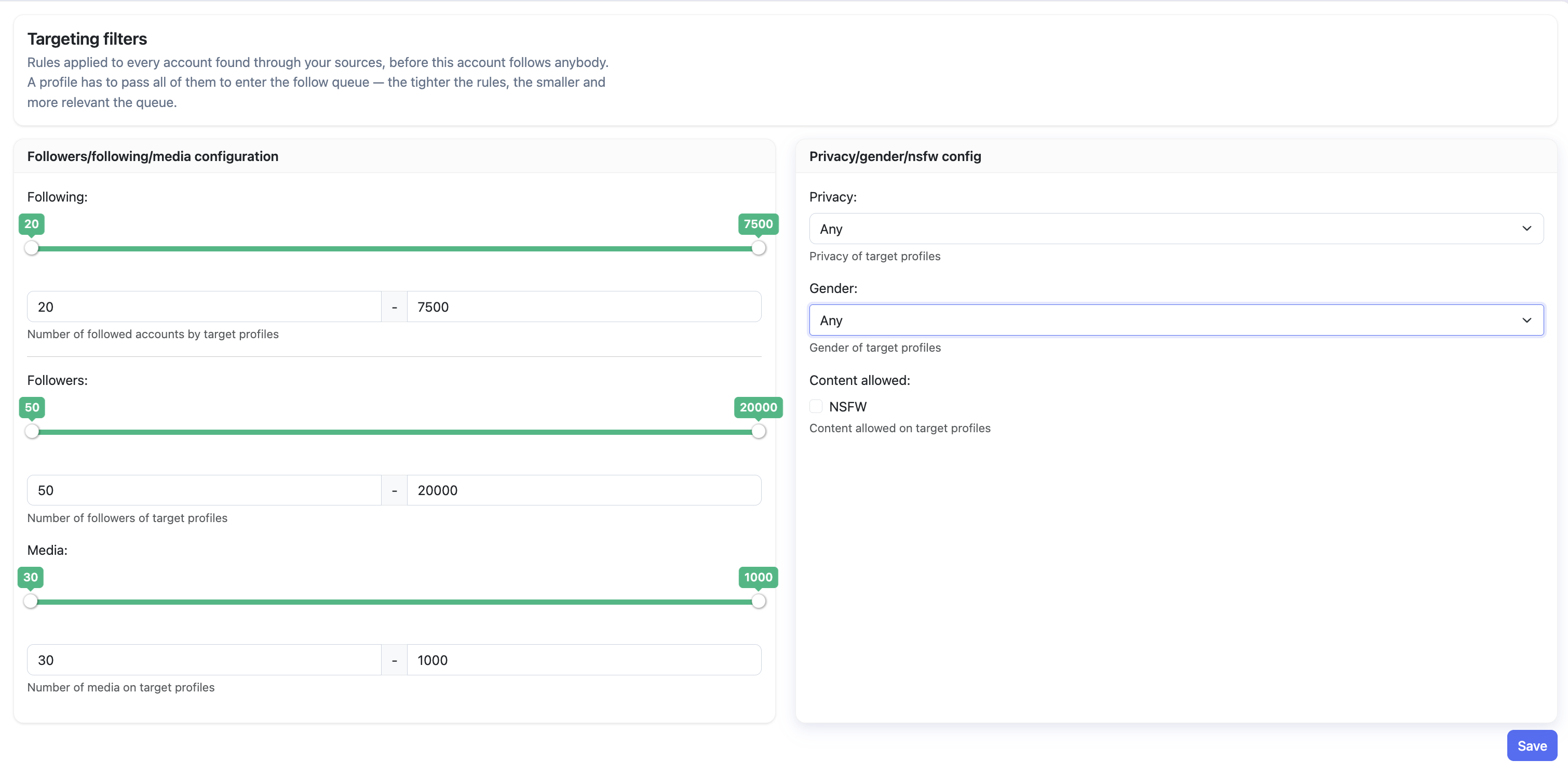
- Follower count — set a minimum and/or maximum number of followers. This helps avoid following massive accounts (who are less likely to notice a follow) and ghost accounts (who have none).
- Following count — set a minimum and/or maximum number of accounts the user follows. Accounts following an extremely high number of people are often bots or follow-for-follow accounts.
- Post count — require a minimum number of posts. Accounts with zero posts are almost certainly bots or inactive.
- Privacy — choose whether to target public accounts only, private accounts only, or any account. Private accounts will see the follow request but conversion rates are typically lower, so most setups target public only or any.
- Gender — target male accounts, female accounts, or any. When an account has pronouns in the bio, Oxelio uses those directly. When it doesn't, Oxelio runs the account name through its database — though gender-neutral names (Taylor, Sam, and similar) won't always resolve accurately, so this filter works best as a soft preference rather than a hard rule.
Targeting Filters
What to Expect
Filters reduce the size of the effective targeting pool. A narrower pool means fewer accounts are followed per day (since more are skipped), but the accounts that are followed are a better match for your client. This trade-off typically improves the followback rate, meaning the same daily follow volume produces more actual followers.
How to Configure
- Open the account from the dashboard.
- Go to the Interaction Filters page.
- Enable the filters you want to apply and set the relevant thresholds.
- Save your changes — filters take effect on the next action cycle.
Dashboard Settings
| Filter | Description | Recommended Starting Value |
|---|---|---|
| Min followers | Skip accounts with fewer than this many followers. | 50 |
| Max followers | Skip accounts with more than this many followers. | 20,000 |
| Min following | Skip accounts following fewer than this many accounts. | 20 |
| Max following | Skip accounts following more than this many accounts. | 7,500 |
| Min media | Skip accounts with fewer than this many posts. | 30 |
| Max media | Skip accounts with more than this many posts. | 1,000 |
| Privacy | Target public accounts only, private accounts only, or any. | Any |
| Gender | Target male, female, or any accounts. Resolved from bio pronouns first, then name database. | Any |
Best Practices
- Set a minimum post count to avoid newly-created bot accounts — the default of 30 is a solid starting point.
- Don't set the max following too low — many real, engaged users follow several thousand accounts.
- If followback rate is low, try switching Privacy to Public only — public accounts are far more likely to follow back than private ones.
- Monitor the followback rate in Analytics after changing filters, to confirm the change improved quality.
- If the queue drains much faster than expected, your filters may be too permissive. If it barely moves, they may be too restrictive.
FAQ
Do filters apply retroactively to accounts already in the queue?
No. Filters are applied at the point Oxelio evaluates the next account to follow. Accounts already queued before a filter change are not re-evaluated.
Can I disable all filters?
Filters ship with defaults that are already tuned for a good followback rate — the starting values shown above are the recommended baseline. You can adjust any of them, but starting from the defaults and changing one at a time is the best approach.
Do filters affect unfollows?
No. Interaction Filters only affect which accounts Oxelio follows. Unfollow logic is determined separately by Dynamics.
Troubleshooting
| Issue | Next Step |
|---|---|
| Growth has stalled despite active sources | Check if filters are too restrictive — try relaxing follower or following caps. |
| Followback rate is very low | Tighten filters — raise the post count minimum, or set Privacy to Public only to skip private accounts that rarely follow back. |
| Filters saved but seem to have no effect | Filters apply on the next action cycle, not immediately. Check again after a few hours. |