Control the pace of follows and unfollows, how the account warms up, and how it cycles between the two.
Dynamics
Overview
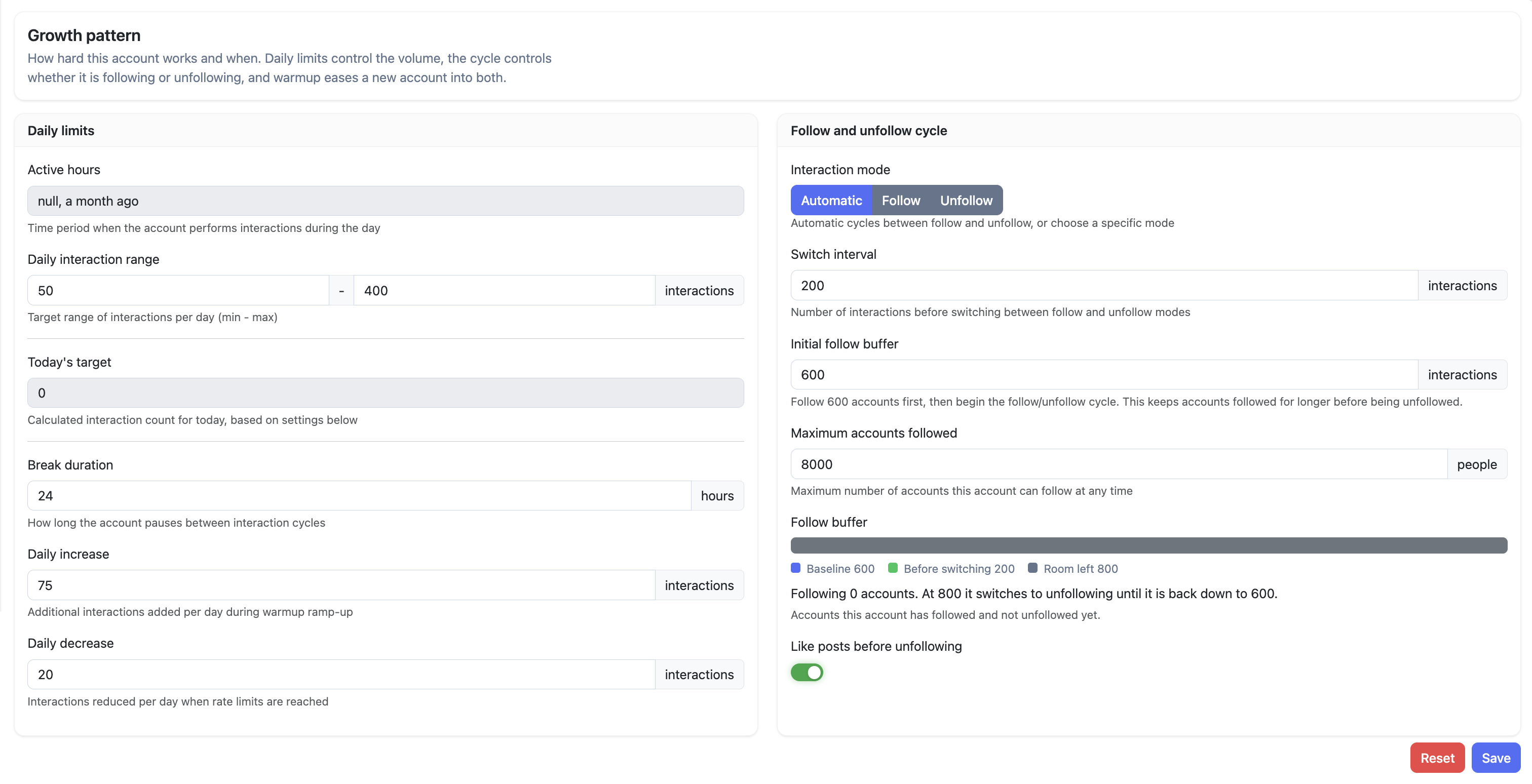
Dynamics is where you configure the pace and rhythm of an account's growth. It controls how many interactions happen per day, when the account follows vs. unfollows, and how it handles warmup and rate limit responses. Getting these settings right is the most important lever for balancing growth speed against account safety.
How it Works
The page is split into two panels:
- Daily limits — controls volume: how many interactions happen per day, how the account ramps up or down, and how long it pauses between cycles.
- Follow and unfollow cycle — controls what those interactions are: following, unfollowing, or switching between the two automatically.
In Automatic mode, Oxelio follows a batch of accounts until the following count hits the buffer threshold, then switches to unfollowing until the count drops back to the baseline — then starts following again. Interactions are spread across the day with variable timing to mimic natural behavior.
Growth Pattern
What to Expect
Today's target is calculated from the daily interaction range and the current warmup state — it's shown read-only on the page. The account works toward that target, then pauses for the Break duration before the next cycle begins.
How to Configure
- Open the account from the dashboard and go to Dynamics.
- Set the Daily interaction range (min and max). The system picks a target within this range each day. For new accounts, start at 50 min / 150–200 max and increase gradually. Established accounts can run up to 400 max.
- Set the Break duration — hours the account pauses between interaction cycles.
- Set the Daily increase — interactions added per day during warmup. This lets you ramp up gradually instead of jumping straight to the max.
- Set the Daily decrease — interactions removed per day if a rate limit fires. The system handles this automatically once set.
- Choose an Interaction mode: Automatic (recommended), Follow only, or Unfollow only.
- In Automatic mode, set the Switch interval — interactions before the mode switches between follow and unfollow.
- Set the Initial follow buffer — accounts to follow before the cycle begins. A higher buffer means followed accounts stay in the following state longer before being unfollowed.
- Set Maximum accounts followed — a hard cap on total following count at any time.
- Toggle Like posts before unfollowing if you want Oxelio to like a post before each unfollow.
- Save your changes.
Dashboard Settings
| Setting | Description | Recommended |
|---|---|---|
| Daily interaction range | Min–max interactions per day. System picks a target within this range. | 50 min / 150–200 max (new accounts); up to 400 max (established) |
| Today's target | Read-only. Calculated from the range and current warmup state. | — |
| Break duration | Hours paused between interaction cycles. | 24 hrs |
| Daily increase | Interactions added per day during warmup ramp-up. | 20–75 |
| Daily decrease | Interactions reduced per day when rate limits are hit. | 10–20 |
| Interaction mode | Automatic (cycles follow/unfollow), Follow only, or Unfollow only. | Automatic |
| Switch interval | Interactions before switching between follow and unfollow. | 200 |
| Initial follow buffer | Accounts followed before the cycle starts. | 600 |
| Maximum accounts followed | Hard cap on total accounts followed at any time. | 8,000 |
| Like posts before unfollowing | Likes a post before each unfollow to soften the action. | On |
Best Practices
- Use Automatic mode unless you need to force a specific direction — it handles the follow/unfollow cycle for you.
- Set the initial follow buffer high enough that followed accounts have time to see the follow and follow back before the unfollow cycle kicks in.
- Keep Daily increase modest (20–50) on new accounts — aggressive warmup is one of the most common rate limit triggers.
- The Daily decrease handles rate limit responses automatically — you don't need to manually lower the daily range when a limit fires.
- Use Unfollow only mode if the following count has grown too high and needs a cleanup run.
FAQ
What's the difference between Automatic, Follow, and Unfollow modes?
Automatic cycles between following and unfollowing based on the Switch interval and Follow buffer. Follow only is useful when building the audience before unfollows begin. Unfollow only is useful for cleaning up a bloated following count.
What does the Initial follow buffer do?
It sets how many accounts Oxelio follows before starting the cycle. With a buffer of 600 and a switch interval of 200, Oxelio follows until the total reaches 800, then unfollows back down to 600, then follows again. The buffer gives followed accounts more time to follow back before being unfollowed.
What is Today's target and can I change it?
It's calculated by the system from the daily range and warmup state. You control it indirectly via the Daily interaction range and Daily increase/decrease — it can't be set directly.
What happens when the Maximum accounts followed cap is hit?
Oxelio switches to unfollowing automatically until the count drops below the cap, then resumes following.
Troubleshooting
| Issue | Next Step |
|---|---|
| Account hits rate limits | Daily decrease should reduce targets automatically. If limits persist, manually lower the daily max. See Rate Limits. |
| Following count keeps growing | Lower the Switch interval or Maximum accounts followed so unfollowing kicks in sooner. |
| Account not reaching daily targets | Check sources — pool may be depleted or filters too restrictive. See Sources and Interaction Filters. |
| Account following but never unfollowing | Interaction mode may be set to Follow only — switch to Automatic. |
| Account unfollowing but never following | Interaction mode may be set to Unfollow only — switch to Automatic. |