Understand Instagram's daily action limits and how Oxelio manages them to keep accounts safe.
Rate Limits
Overview
Instagram sets limits on how many actions an account can take per day. These limits exist to prevent spam and protect the platform. Oxelio is designed to operate within these limits automatically, but understanding how they work helps you get the most out of the service and troubleshoot when growth stalls.
How it Works
Rate limits on Instagram apply per account, per action type. The main actions with limits are:
- Follows — the number of accounts you can follow in a 24-hour period.
- Unfollows — the number of accounts you can unfollow in a 24-hour period.
- Likes — the number of posts you can like in a 24-hour period (relevant if Like After Follow is enabled).
- Direct messages — the number of DMs that can be sent per day (relevant if Welcome DM is enabled).
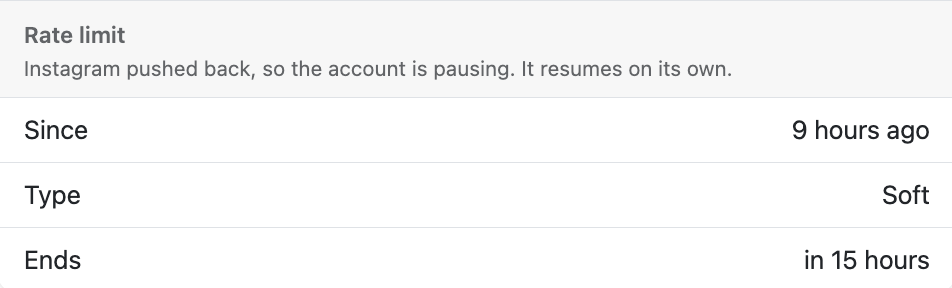
Oxelio stays within Instagram's safe thresholds by spacing actions across the day and respecting daily caps defined in your Dynamics settings. When Instagram pushes back, Oxelio pauses activity on that account automatically and resumes when the limit clears — no manual action required.
When a rate limit is active, the widget on the account page shows three fields:
- Since — how long ago the limit was triggered.
- Type — Soft limits are mild slowdowns that clear quickly on their own. Hard limits are stricter and may take longer to recover from.
- Ends — estimated time until the limit clears and activity resumes.
What to Expect
If a rate limit is detected, you'll see a "Cooldown is active" alert on the Account Overview page. Oxelio will automatically resume activity once the limit clears — the widget shows you exactly when. You don't need to manually intervene.
Rate limits are more likely on newer accounts or accounts that have recently increased activity. Oxelio ramps up gradually for new accounts to reduce the risk of hitting a limit.
How to Configure
You don't configure rate limits directly — Instagram sets them. What you can control is how close to the limit Oxelio operates:
- Open the account from the dashboard.
- Go to Dynamics.
- Review the Daily Interaction Range. Lowering these values gives more headroom before a rate limit is reached.
- If the account is new, consider starting with conservative numbers and increasing them gradually over the first 2–4 weeks.
Best Practices
- Start new accounts conservatively. Oxelio ramps up automatically, but avoid pushing daily targets high in the first few weeks.
- If a rate limit occurs, wait for it to clear naturally — Oxelio will resume automatically.
- Combine rate limit awareness with good targeting: following highly relevant accounts leads to better followback rates, which makes lower volume more effective.
- Check Account Safety if you're concerned about a specific account's risk level.
FAQ
Will a rate limit permanently affect the account?
No. Rate limits are temporary — usually 24 hours. Oxelio resumes activity automatically once the limit clears. Persistent issues may indicate the daily targets are set too high.
Does Oxelio warn me before hitting a rate limit?
Oxelio manages the pacing automatically to avoid limits where possible. If a limit is detected, you'll see an alert on the Account Overview page.
Can I manually clear a rate limit?
No. Rate limits are set and cleared by Instagram. The only action is to wait. Toggling automation won't speed up the reset.
Troubleshooting
| Issue | Next Step |
|---|---|
| Account shows rate limit alert | No action needed — Oxelio will resume automatically. Check Account Overview for status. |
| Rate limit recurs frequently | Lower the daily targets in Dynamics and let the account stabilize at the lower level. |
| Account appears stuck even after limit should have cleared | Check the Account Overview for any other alerts. If only the rate limit alert remains for more than 24 hours, contact Oxelio support to debug. |